Overview
The Genetec C# SDK Integration for Bearing enables real-time security event ingestion from Genetec Security Center into the Bearing Physical Security Management Application on ServiceNow.
It provides:
- Real-time camera alerts → Bearing Alert Queue
- Automatic CI mapping to ServiceNow Camera Configuration Items
- Configurable event subscriptions via a JSON configuration file
- Support for multiple Genetec object types (cameras, NVRs/video units, archivers, doors, intrusion zones—any object with supported health events)
- Lightweight monitoring microservice that uses Genetec’s WebSDK to subscribe to event notifications
This integration is required for customers who want unified physical security monitoring directly inside their ServiceNow environment, with all alerts normalized and sent to the Bearing Universal Event Webhook.
* CI mapping requires an export of devices from Genetec and an import set to Bearing to ensure the UID is associated with the CI in CMDB.
Architecture
High-Level Data Flow
- Genetec Security Center monitors cameras, video units, and other objects.
- The Bearing WebSDK Integration App connects to Genetec via the WebSDK and subscribes to specific event types.
- When events trigger, the Integration App:
- Parses the event
- Normalizes fields (type, priority, category, device path)
- Resolves the related Genetec entity GUID
- Sends a POST payload to the Bearing Universal Event Webhook
- Bearing automatically:
- Creates the Alert
- Links the Camera CI
- Runs categorization rules
- Displays the alert in the Bearing Alert Queue
Components & Roles
Genetec Components
- Directory – Core authentication and config store
- Archivers – Process device (camera) health and video stream status for a geographic site
- Video Units (NVRs) – Logical units to which cameras connect
- Cameras – Actual streaming devices
- Any of these components can emit a health or state event
Bearing Components
- Bearing Integration App – Listens for Genetec events
- Universal Event Webhook – Receives and normalizes all event data
- Alert Engine – Creates ServiceNow Bearing Alerts
- Camera CIs – Represent camera devices in ServiceNow CMDB
- Event Configuration JSON – Defines which Genetec events to listen for
Configuration Guide
Prerequisites
Genetec Requirements
- Bearing Genetec License (Bearing will provide the part number here, after certification of the Bearing app)
- Dedicated integration user with:
- Directory read access
- Camera and video unit read access
- Event monitoring permissions
Installation Steps
- Deploy the Bearing Integration App.
- Configure config.json (see syntax below).
- Input Genetec credentials and Directory hostname.
- Input the Bearing Universal Event Webhook URL.
- Start the service.
- Confirm the app connects to the Genetec Directory successfully.
- Trigger test events from the Genetec Config Tool to validate end-to-end flow.
Event Configuration File (config.json)
The integration uses a JSON configuration file that defines:
- Which events to subscribe to
- Event categories
- Priority
- Whether they should map to CIs
- Any filtering rules
Example
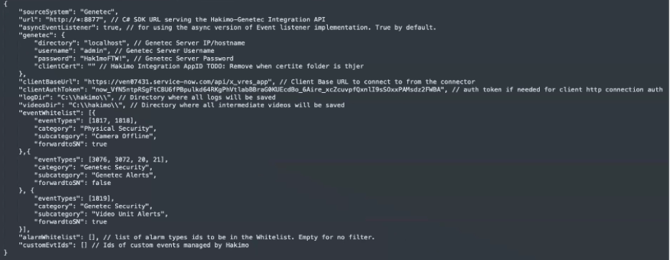
This JSON structure can be extended by any Genetec event.
CI Mapping Logic
Example normalized alert payload as sent from the C# SDK app to Bearing Webhook:
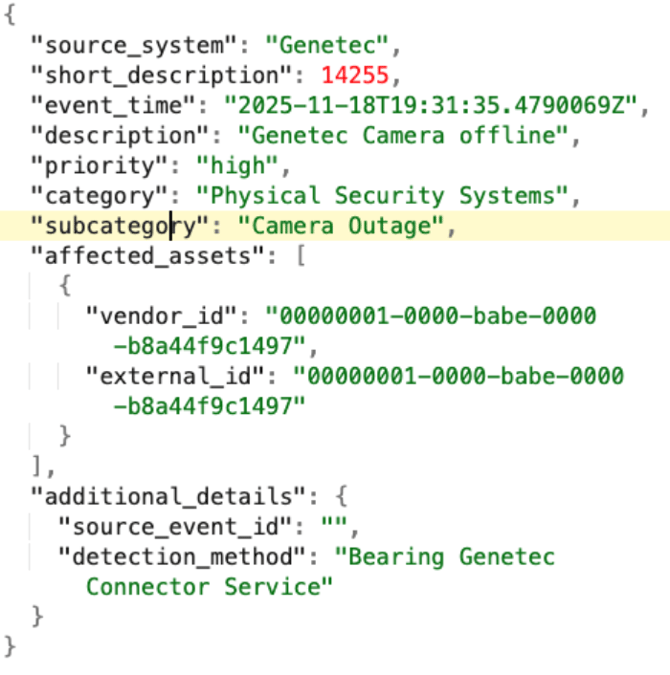
Expected Behavior
When an event is received, the app:
- Extracts the Genetec vendor_id from the event payload
- Queries the corresponding GUID in ServiceNow: cmdb_ci_camera.u_genetec_guid = {guid}
- If found → attach the CI to the alert
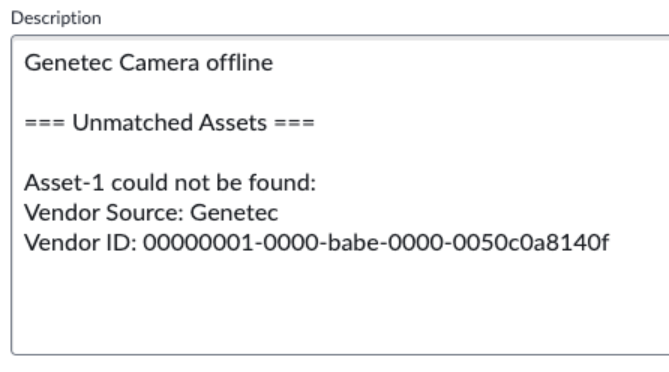
- If not found → log mismatch + create generic alert without CI (The asset not found data is rinted in the alert description in this case)