
Milestone Webhook API Technical Documentation
Overview
The Milestone Webhook API provides a secure and structured RESTful interface for Milestone XProtect Systems to create Alerts directly within the Bearing Application.
Terminology Note: Milestone uses the term "Event" to refer to occurrences within its system. Bearing uses the term "Alert" to refer to actionable items added to the Alert Queue for processing. This webhook acts as a translator: it accepts Milestone's standard Event payload and maps those values to Bearing Alert values. Bearing does not use Milestone's model internally. A Milestone Event that has been filtered as potentially actionable is sent to the Bearing Alert Webhook and added as a Bearing Alert in the Alert Queue for processing.
Important: Customers should filter events on the Milestone side before sending to Bearing. Only events that represent a potential request or incident should be forwarded to this webhook. Do not send all events indiscriminately.
This API is specifically designed to receive and process Milestone Events, including:
- External events triggered by integrations
- Camera status changes
- Motion detection alerts
- System health notifications
- Access control events
- Other monitoring alerts
Benefits:
- Automated alert creation
- Intelligent CI (Configuration Item) matching with CMDB
- Reduce manual data entry and response time
- Ensure consistent event data context
- Maintain forensic audit trail
Key Features:
- Dedicated Milestone event processing
- Automatic CI matching via vendor-specific ObjectId
- Support for Milestone's native event structure
- Direct integration with Milestone XProtect Corporate
- Automatic priority mapping from Milestone priority levels
Process Flow Diagram
The following process illustrates the end-to-end flow from Milestone event trigger to successful alert creation in Bearing. 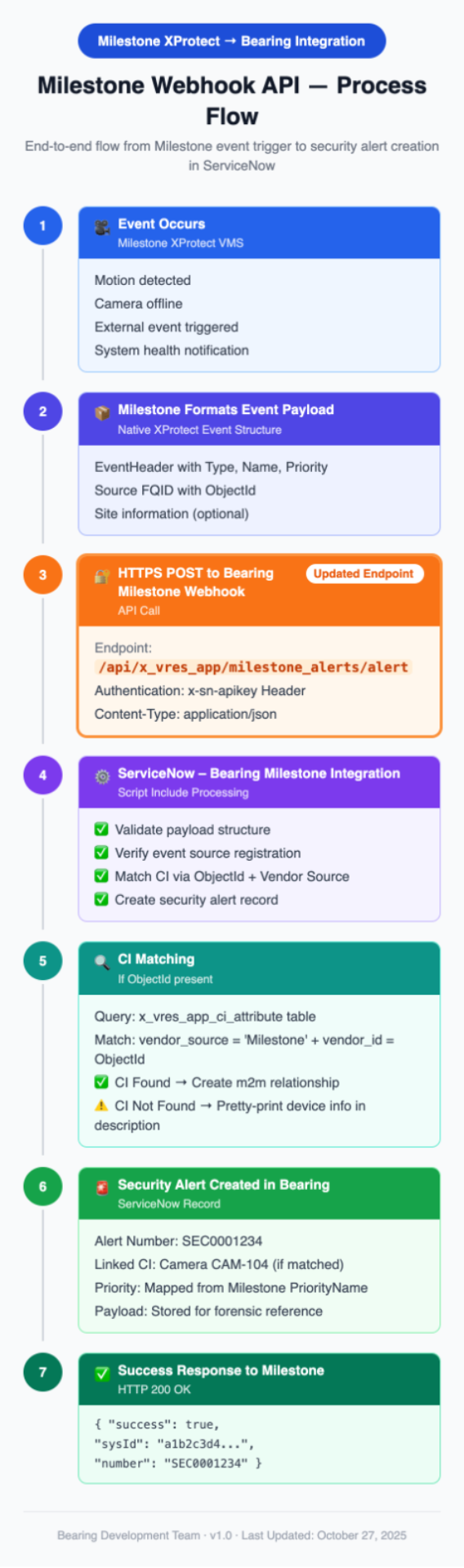
Process Steps
- Event Trigger: An event occurs in the Milestone XProtect VMS (e.g., external event triggered, motion detected, camera status change)
- Payload Formatting: Milestone formats the event data according to its native event structure, including EventHeader with Type, Name, Priority, and Source FQID with ObjectId
- API Call: Milestone sends an HTTPS POST request to the Bearing webhook endpoint using the x-sn-apikey header
- Payload Processing: The Milestone Integration Script Include validates the payload, verifies event source registration, and maps the Milestone Event data to a Bearing Alert
- CI Matching: System attempts to match the device via ObjectId from the payload against the CI Attributes table using vendor_source + vendor_id
- Alert Creation: A Bearing Alert record is created with all relevant data, including m2m relationship to CI if matched
- Success Response: Bearing responds with a success status, alert sys_id, and alert number for Milestone to log
Security and Authentication
The Milestone Webhook API uses a static API key passed in a custom HTTP header for all requests.
How to Get an API Key
You must request an API key from your organization's ServiceNow administrator. The administrator will generate a key specifically for your Milestone system using the Bearing application's configuration panel.
Steps to Generate API Key:
- Navigate to: Bearing > Security Operation Workspace > Configuration > System Definitions > Alerts API Setup
- Generate a new API key for "Milestone" source system
- Securely provide the generated key to your Milestone integration team
How to Use the API Key
Every request to the Milestone Webhook API must include the x-sn-apikey header containing your unique API key.
- Header Name: x-sn-apikey
- Value Format: YOUR_API_KEY
Example Header:
x-sn-apikey: 9af4e02c1b8a1a10f87743d8b24bcb1234abcd5678efgh
Important: Requests made without the x-sn-apikey header or with an invalid/revoked key will be rejected with a 401 Unauthorized error.
HTTPS Requirement
- All requests must be made over HTTPS
- HTTP requests will be rejected
- TLS 1.2 or higher is required
Rate Limiting
- Standard ServiceNow API rate limits apply
- Recommended: Implement exponential backoff for failed requests
- Recommended: Queue events on Milestone side during maintenance windows
Security Best Practices
- Secure Key Storage: Store the API key securely in Milestone system configuration (encrypted if possible)
- Restrict Access: Limit API key visibility to only necessary personnel
- Rotate Keys: Implement regular API key rotation policy
- Monitor API Activity: Review ServiceNow system logs regularly for unauthorized access attempts
- Network Security: Use firewall rules to restrict webhook access to Milestone server IPs only
- Revoke Compromised Keys: Immediately revoke and regenerate API keys if compromise is suspected
API Endpoint Details
Endpoint URL
POST https://your-servicenow-instance.service-now.com/api/x_vres_app/milestone_alerts/alert
Note: Replace "your-servicenow-instance" with the actual URL of your ServiceNow environment.
Example:
https://acme-corp.service-now.com/api/x_vres_app/milestone_alerts/alert
HTTP Method
POST only. GET, PUT, PATCH, and DELETE are not supported.
Required Headers
Content-Type: application/json
x-sn-apikey: YOUR_API_KEY
Optional Headers
Accept: application/json
User-Agent: Milestone-XProtect/version
Content Type
The API accepts only application/json content type. XML, form-data, and other formats are not supported.
Request Payload Description
The Milestone webhook accepts the native Milestone Event structure as provided by XProtect systems. This webhook functions as a translator: it receives the Milestone Event payload and maps the values to Bearing Alert fields internally. Bearing does not use Milestone's data model directly.
Payload Structure
The payload must contain an Event object with EventHeader and Source information, plus an optional Site object for server details.
Complete Example Payload
{
"Event": {
"EventHeader": {
"ID": "2388f93d-5cb0-48e0-9524-d8bb981e1629",
"Timestamp": "2022-11-26T15:59:39.2988877Z",
"Type": "System Event",
"Version": "1.0",
"Priority": 1,
"PriorityName": "High",
"Name": "External Event",
"Message": "External Event",
"Source": {
"Name": "Event High",
"FQID": {
"ServerId": {
"Type": "XPCO",
"Hostname": "ec2amaz-111k11j",
"Port": 80,
"Id": "2f04e7ee-2ee2-49d4-8415-de28dba7ef2e",
"Scheme": "http"
},
"ParentId": "2f04e7ee-2ee2-49d4-8415-de28dba7ef2e",
"ObjectId": "13860010-ded3-42ff-a2a9-cc6ba4a49636",
"FolderType": 0,
"Kind": "c9bdac3f-41dc-4afa-b057-61767a3914b7"
}
},
"MessageId": "0fcb1955-0e80-4fd4-a78a-db47ee89700c"
}
},
"Site": {
"ServerHostname": "ec2amaz-111k11j",
"AbsoluteUri": "http://ec2amaz-111k22j/",
"ServerType": "XPCO"
}
}
Field Definitions
Event.EventHeader (Required)
|
Field Name |
Type |
Required |
Description |
|
Type |
String |
Yes |
Event type classification from Milestone (e.g., "System Event", "Motion Event", "Camera Event"). |
|
Name |
String |
Yes |
Event name from Milestone (e.g., "External Event", "Motion Detected", "Camera Offline"). |
|
Message |
String |
No |
Human-readable event message. Used as short_description if provided, otherwise defaults to "Milestone Alert". |
|
Timestamp |
ISO 8601 String |
No |
When the event occurred in Milestone system. Format: YYYY-MM-DDTHH:MM:SS.FFFFFFFZ. Stored as both event_time and detect_time. |
|
Priority |
Integer |
No |
Numeric priority level from Milestone (e.g., 1, 2, 3). |
|
PriorityName |
String |
No |
Priority name (e.g., "High", "Medium", "Low", "Critical"). Converted to lowercase and stored in the Bearing Alert. Defaults to "low" if omitted. |
|
ID |
String (GUID) |
No |
Unique event identifier from Milestone (for logging/debugging). |
|
Version |
String |
No |
Event schema version (currently "1.0"). |
|
MessageId |
String (GUID) |
No |
Unique message identifier (for deduplication). |
Event.EventHeader.Source (Required)
|
Field Name |
Type |
Required |
Description |
|
Name |
String |
No |
Display name of the source device (e.g., "Camera 104", "NVR-Main"). Used in alert description if CI is not matched. |
Event.EventHeader.Source.FQID (Required)
|
Field Name |
Type |
Required |
Description |
|
ObjectId |
String (GUID) |
Yes |
Critical for CI matching. Unique identifier for the device in Milestone. This is matched against vendor_id in x_vres_app_ci_attribute table. |
|
ParentId |
String (GUID) |
No |
Parent object identifier in Milestone hierarchy. |
|
Kind |
String (GUID) |
No |
Object kind/type identifier. |
|
FolderType |
Integer |
No |
Folder type classification. |
Event.EventHeader.Source.FQID.ServerId (Optional)
|
Field Name |
Type |
Required |
Description |
|
Hostname |
String |
No |
Milestone server hostname. Used in alert description if CI is not matched. |
|
Type |
String |
No |
Server type (e.g., "XPCO" for XProtect Corporate). Used in alert description. |
|
Id |
String (GUID) |
No |
Unique server identifier. |
|
Port |
Integer |
No |
Server port number. |
|
Scheme |
String |
No |
Protocol scheme (e.g., "http", "https"). |
Site (Optional)
|
Field Name |
Type |
Required |
Description |
|
ServerHostname |
String |
No |
Milestone Management Server hostname. |
|
AbsoluteUri |
String |
No |
Full URI to Milestone server. |
|
ServerType |
String |
No |
Server type (e.g., "XPCO"). Used in alert description if CI is not matched. |
Minimal Required Payload
The absolute minimum payload structure required for successful processing:
{
"Event": {
"EventHeader": {
"Type": "System Event",
"Name": "External Event",
"Source": {
"FQID": {
"ObjectId": "13860010-ded3-42ff-a2a9-cc6ba4a49636"
}
}
}
}
}
Payload Validation
The webhook validates the following structure:
- Event object exists
- Event.EventHeader object exists
- Event.EventHeader.Source object exists
- Event.EventHeader.Type field is present
- Event.EventHeader.Name field is present
- Event.EventHeader.Source.FQID.ObjectId field is present
Validation Errors:
- Missing any required object: 400 Bad Request
- Missing Type or Name: 400 Bad Request - Missing required fields 'Type' or 'Name' in EventHeader
- Missing ObjectId: 400 Bad Request - Missing required field 'ObjectId' in Source.FQID
CI Matching Strategy
The Milestone webhook uses vendor-specific CI matching via the Milestone ObjectId.
Matching Process
Primary Strategy: Vendor Source + Vendor ID
The system searches for Configuration Items (CIs) using the ObjectId from the Milestone payload:
Search: x_vres_app_ci_attribute
WHERE:
- vendor_source = sys_id of "Milestone" event source
- vendor_id = ObjectId from payload
CI Matching Behavior
|
Scenario |
Result |
Description Field |
CI Relationship |
|
CI Found |
Success |
"Milestone event 'Message' was triggered for the associated asset." |
m2m link created in x_vres_app_m2m_alert_ci |
|
CI Not Found |
Alert Created |
Pretty-printed device details with ObjectId, Hostname, Server Type |
No m2m relationship |
|
No ObjectId |
Alert Created |
Generic description |
No m2m relationship |
Example: CI Found
Input:
{
"Event": {
"EventHeader": {
"Message": "Motion Detected",
"Source": {
"FQID": {
"ObjectId": "13860010-ded3-42ff-a2a9-cc6ba4a49636"
}
}
}
}
}
Result:
- CI matched via ObjectId
- M2M relationship created
- Description: "Milestone event 'Motion Detected' was triggered for the associated asset."
Example: CI Not Found
Input:
{
"Event": {
"EventHeader": {
"Source": {
"Name": "Camera NVR-Unknown-104",
"FQID": {
"ObjectId": "99999999-0000-0000-0000-000000000000",
"ServerId": {
"Hostname": "milestone-server-01"
}
}
}
}
},
"Site": {
"ServerType": "XPCO"
}
}
Result:
- CI not found
- Alert created with pretty-printed info
- Description:
Camera NVR-Unknown-104 could not be found:
Hostname: milestone-server-01
Server Type: XPCO
Vendor Source: Milestone
Vendor ID: 99999999-0000-0000-0000-000000000000
Data Requirements
Event Source Registration
Before sending events, ensure the Milestone event source is registered in ServiceNow.
Table: x_vres_app_event_source
|
Field |
Value |
|
name |
"milestone" (lowercase, exact match required) |
|
source_name |
"Milestone" (display name) |
How to Register:
- Navigate to: x_vres_app_event_source table in ServiceNow
- Click New
- Set Name: milestone and Source Name: Milestone
- Click Submit
CI Attribute Configuration
For successful CI matching, populate the CI Attributes table.
Table: x_vres_app_ci_attribute
|
Field |
Description |
Example |
|
vendor_source |
Reference to x_vres_app_event_source (Milestone) |
sys_id of Milestone event source |
|
vendor_id |
ObjectId from Milestone XProtect |
"13860010-ded3-42ff-a2a9-cc6ba4a49636" |
|
configuration_item |
Reference to actual CI in cmdb_ci |
sys_id of Camera CI |
How to Configure:
- Navigate to: x_vres_app_ci_attribute table
- Click New for each device
- Set Vendor Source (Milestone), Vendor ID (ObjectId), and Configuration Item (CI from CMDB)
- Click Submit
Pro Tip: Export ObjectIds from Milestone XProtect Management Client and bulk-import CI attributes via CSV or Integration Hub.
Response Handling
Success Response (200 OK)
Indicates the Bearing Alert was successfully created.
HTTP Status: 200 OK
Response Body:
{
"success": true,
"message": "Bearing alert created successfully from Milestone event.",
"sysId": "a1b2c3d4e5f6g7h8i9j0k1l2m3n4o5p6",
"number": "SEC0001234"
}
Response Fields:
|
Field |
Type |
Description |
|
success |
Boolean |
Always true for successful requests |
|
message |
String |
Human-readable success message |
|
sysId |
String |
ServiceNow sys_id of the created Bearing Alert record |
|
number |
String |
Alert number (e.g., "SEC0001234") for reference |
Error Responses
400 Bad Request - Invalid Payload
Cause: Payload structure is invalid or missing required fields.
Response Body:
{
"success": false,
"message": "Invalid payload: Missing required fields 'Type' or 'Name' in EventHeader.",
"error": "Error: Invalid payload: Missing required fields 'Type' or 'Name' in EventHeader."
}
Common Causes:
- Missing Event or EventHeader object
- Missing Type field
- Missing Name field
- Missing Source.FQID.ObjectId field
401 Unauthorized - Authentication Failed
Cause: Invalid or missing API key.
Response Body:
{
"success": false,
"message": "Unauthorized. Invalid API Key."
}
Common Causes:
- Missing x-sn-apikey header
- Invalid API key value
- Revoked or expired API key
- API key not registered for Milestone source system
500 Internal Server Error - Configuration Issue
Cause: Event source not configured or server-side processing error.
Response Body:
{
"success": false,
"message": "The event source 'milestone' is not configured in the system. Please add it to the 'x_vres_app_event_source' table.",
"error": "Error: The event source 'milestone' is not configured in the system."
}
Common Causes:
- Milestone event source not registered in x_vres_app_event_source table
- Database insert failed
- Unexpected server error
Response Status Code Summary
|
Status Code |
Meaning |
Action Required |
|
200 OK |
Success |
None - Bearing Alert created successfully |
|
400 Bad Request |
Invalid payload structure |
Fix payload format and required fields |
|
401 Unauthorized |
Invalid or missing API key |
Verify x-sn-apikey header and key validity |
|
500 Internal Server Error |
Configuration or server error |
Check event source configuration, contact admin |
Implementation Examples
cURL Example
Complete payload with all fields:
curl -X POST \
https://your-instance.service-now.com/api/x_vres_app/milestone_alerts/alert \
-H 'Content-Type: application/json' \
-H 'x-sn-apikey: YOUR_API_KEY_HERE' \
-d '{
"Event": {
"EventHeader": {
"ID": "2388f93d-5cb0-48e0-9524-d8bb981e1629",
"Timestamp": "2022-11-26T15:59:39.2988877Z",
"Type": "System Event",
"Version": "1.0",
"Priority": 1,
"PriorityName": "High",
"Name": "External Event",
"Message": "External Event",
"Source": {
"Name": "Event High",
"FQID": {
"ServerId": {
"Type": "XPCO",
"Hostname": "ec2amaz-111k11j",
"Port": 80,
"Id": "2f04e7ee-2ee2-49d4-8415-de28dba7ef2e",
"Scheme": "http"
},
"ParentId": "2f04e7ee-2ee2-49d4-8415-de28dba7ef2e",
"ObjectId": "13860010-ded3-42ff-a2a9-cc6ba4a49636",
"FolderType": 0,
"Kind": "c9bdac3f-41dc-4afa-b057-61767a3914b7"
}
},
"MessageId": "0fcb1955-0e80-4fd4-a78a-db47ee89700c"
}
},
"Site": {
"ServerHostname": "ec2amaz-111k11j",
"AbsoluteUri": "http://ec2amaz-111k22j/",
"ServerType": "XPCO"
}
}'
Minimal payload with required fields only:
curl -X POST \
https://your-instance.service-now.com/api/x_vres_app/milestone_alerts/alert \
-H 'Content-Type: application/json' \
-H 'x-sn-apikey: YOUR_API_KEY_HERE' \
-d '{
"Event": {
"EventHeader": {
"Type": "System Event",
"Name": "External Event",
"Source": {
"FQID": {
"ObjectId": "13860010-ded3-42ff-a2a9-cc6ba4a49636"
}
}
}
}
}'
Milestone XProtect Configuration
To configure Milestone XProtect to send events to this webhook:
- Get API Key from ServiceNow:
- Navigate to: Bearing > Security Operation Workspace > Configuration > System Definitions > Alerts API Setup
- Generate API key for "Milestone" source system
- Copy the generated API key
- Open Milestone XProtect Management Client
- Navigate to: Rules and Events > Notifications
- Create New HTTP Notification:
- Name: Bearing Webhook
- URL: https://your-instance.service-now.com/api/x_vres_app/milestone_alerts/alert
- Method: POST
- Content-Type: application/json
- Custom Headers: Header Name = x-sn-apikey, Header Value = Your API Key
- Configure Notification Body: Use the native Milestone event structure (automatically includes Event, EventHeader, Source FQID with ObjectId, and Site information)
- Create Rule:
- Trigger: Select desired event types (e.g., Motion Detected, Camera Offline, External Event). Filter to only those events that represent a potential request or incident.
- Action: Send HTTP Notification and select "Bearing Webhook"
- Test the Integration:
- Trigger a test event from a camera or device
- Check Bearing for the created Alert
- Verify CI matching in the alert's "Affected CIs" related list
Troubleshooting
1. "Invalid payload: Missing required fields 'Type' or 'Name' in EventHeader"
Cause: The payload structure is incomplete or incorrectly formatted.
Solution:
- Verify the payload includes Event.EventHeader.Type
- Verify the payload includes Event.EventHeader.Name
- Check that the JSON is properly formatted
- Ensure Content-Type header is set to application/json
Example of correct structure:
{
"Event": {
"EventHeader": {
"Type": "System Event",
"Name": "External Event"
}
}
}
2. "Invalid payload: Missing required field 'ObjectId' in Source.FQID"
Cause: The ObjectId field is missing from the Source FQID, which is required for CI matching.
Solution:
- Ensure Milestone is configured to include the full FQID structure
- Verify Event.EventHeader.Source.FQID.ObjectId exists in payload
- Check Milestone event configuration includes device identifiers
Example of correct structure:
{
"Event": {
"EventHeader": {
"Source": {
"FQID": {
"ObjectId": "13860010-ded3-42ff-a2a9-cc6ba4a49636"
}
}
}
}
}
3. "The event source 'milestone' is not configured in the system"
Cause: The Milestone event source has not been registered in ServiceNow.
Solution:
- Navigate to: x_vres_app_event_source table
- Click New
- Create record: Name = milestone (lowercase, exact), Source Name = Milestone
- Click Submit
- Retry the webhook request
4. 401 Unauthorized Error
Cause: API key is missing or invalid.
Solution:
- Verify the x-sn-apikey header is included in the request
- Check that the API key value is correct (no extra spaces or line breaks)
- Confirm the API key is valid and not revoked
- Ensure the API key is registered for the "Milestone" source system
- Regenerate API key if necessary via Bearing > Security Operation Workspace > Configuration > System Definitions > Alerts API Setup
5. Alert Created but CI Not Matched
Cause: ObjectId from Milestone does not match any vendor_id in the CI Attributes table.
Step 1: Verify ObjectId is in Payload
- Check the alert's payload field in Bearing
- Look for Event.EventHeader.Source.FQID.ObjectId
- Copy the ObjectId value
Step 2: Check CI Attributes Table
- Navigate to: x_vres_app_ci_attribute
- Filter by Vendor Source = Milestone and Vendor ID = ObjectId from payload
- If no results found, the CI attribute is missing
Step 3: Create CI Attribute Record
- Click New
- Set Vendor Source = Milestone, Vendor ID = ObjectId from Milestone, Configuration Item = corresponding CI from CMDB
- Click Submit
Step 4: Test Again
- Trigger another event from the same device
- Verify CI is now matched and m2m relationship is created
Pro Tip: Bulk-import CI attributes by exporting device ObjectIds from Milestone XProtect Management Client and creating a CSV import file.
6. Alerts Created with Pretty-Printed Device Info Instead of CI Links
Cause: This is expected behavior when CI matching fails.
Expected Description Format:
Device Name could not be found:
Hostname: hostname
Server Type: server type
Vendor Source: Milestone
Vendor ID: ObjectId
Solution:
- This is not an error - the alert was created successfully
- Use the Vendor ID (ObjectId) from the description to create a CI Attribute record (see Issue 5)
- Future events from this device will be automatically matched once CI attribute is configured
7. Milestone Not Sending Events to Bearing
Cause: Milestone XProtect rule/notification configuration issue.
Step 1: Verify HTTP Notification Configuration
- Open Milestone XProtect Management Client
- Navigate to: Rules and Events > Notifications
- Find your Bearing notification and verify: URL is correct, Method is POST, Content-Type is application/json, and x-sn-apikey header is configured correctly
Step 2: Check Rule Configuration
- Navigate to: Rules and Events > Rules
- Verify the rule is Enabled, the event trigger is correctly configured, and the action includes "Send HTTP Notification" to Bearing
Step 3: Test Notification
- In Milestone, right-click the notification
- Select Test Notification
- Check if alert appears in Bearing
- If test fails, enable debug logging under Tools > Options > Logging and review logs
Step 4: Check Network Connectivity
curl -X POST https://your-instance.service-now.com/api/x_vres_app/milestone_alerts/alert \
-H "Content-Type: application/json" \
-H "x-sn-apikey: YOUR_API_KEY_HERE" \
-d '{"Event":{"EventHeader":{"Type":"Test","Name":"Test","Source":{"FQID":{"ObjectId":"test"}}}}}'
Debugging Tips
1. Enable Debug Logging in ServiceNow
Navigate to: System Logs > All. Filter by: Source = "x_vres_app.MilestoneIntegration". Look for error messages and stack traces.
Common log messages:
- "Found matching CI with sys_id: [sys_id] for ObjectId: [ObjectId]" - CI matched successfully
- "No CI found with vendor_source sys_id='[sys_id]' (Milestone) and vendor_id='[ObjectId]'" - CI not found
- "Error processing Milestone webhook: [error message]" - Processing error
2. Verify Event Source Configuration
Navigate to: x_vres_app_event_source. Filter: name = "milestone". Verify record exists with correct name (lowercase).
3. Check CI Attribute Data
Navigate to: x_vres_app_ci_attribute. Check for records with vendor_source = Milestone event source sys_id, vendor_id = ObjectId from Milestone, and configuration_item = valid CI sys_id.
4. Review Full Alert Record
Navigate to: x_vres_app_security_event. Open the created alert and check fields: source (should reference "Milestone" event source), payload (raw JSON from Milestone), description (CI link message or pretty-printed device info), and Related Lists > Affected CIs (should show m2m relationship if CI matched).
Best Practices
- Filter Before Sending: Only send Milestone Events to Bearing that represent a potential request or incident. Configure Milestone rules to filter events before forwarding to this webhook.
- Register Event Source First: Always create the "milestone" event source before sending test events. Verify the name field is lowercase and exact.
- Pre-populate CI Attributes: Extract ObjectIds from Milestone XProtect before going live. Bulk-import CI attributes to ensure a high match rate from day 1.
- Implement Retry Logic: Configure Milestone with retry attempts for failed notifications. Use exponential backoff for transient failures.
- Monitor Integration Health: Set up Bearing alerting for webhook failures. Review Milestone notification logs regularly. Track CI match rate and investigate unmatch patterns.
- Test Before Production: Create test event sources and test alerts. Verify CI matching with known devices. Test error scenarios (invalid payloads, auth failures).
- Document ObjectId Mapping: Maintain a mapping document of Milestone ObjectIds to Bearing CIs. Include device names, locations, and purposes for easy troubleshooting.
Getting Help
If you continue to experience issues:
- Collect Diagnostic Information:
- Error message from Milestone notification logs
- Sample payload (sanitized, remove sensitive data)
- ServiceNow system logs (System Logs > All, filter by MilestoneIntegration)
- Event source configuration screenshot
- CI attribute records for the affected device
- Check Documentation:
- Review this document for matching requirements
- Check Bearing application documentation for CI data model
- Contact Support:
- Milestone Support: For issues with event generation and HTTP notification configuration
- ServiceNow Administrator: For permission issues, event source configuration, and CI matching
- Bearing Support: For questions about the Bearing application and webhook functionality
Appendix: Database Tables Reference
|
Table |
Purpose |
|
x_vres_app_security_event |
Bearing Alert records |
|
x_vres_app_event_source |
Registered event sources (Milestone, Genetec, etc.) |
|
x_vres_app_ci_attribute |
CI attributes for vendor-specific matching |
|
x_vres_app_m2m_alert_ci |
Many-to-many relationships between alerts and CIs |
|
cmdb_ci |
Configuration Items (cameras, NVRs, servers, etc.) |