Physical Security Operations are designed to manage the non-impactful security operations within your organization. These include types such as Guard Tours, Drills, and Site Security Assessments. PSOs are located in the Task menu on the left hand side of the screen.
Creating a new PSO:
- From the Task menu select “All” under Physical Security Operations, and then select “New”
- Fill out the applicable fields
-
- Name: The name of the Guard Tour
- Channel: Manual
-
- Operation Type:
-
-
- Drill
-
-
-
- Guard Tour
-
-
-
- Site Security Assessment
- Assignment Group/Assigned to: The group or user that the Operation will be assigned to
-
- Select “Save”
Guard Tours
Once a Guard Tour is saved, you’ll then be able to set a schedule for the tour. This can be set as On Demand, Daily, Weekly, or Monthly, and you will be prompted to select a Time Zone and a Time that the Guard Tour should be conducted.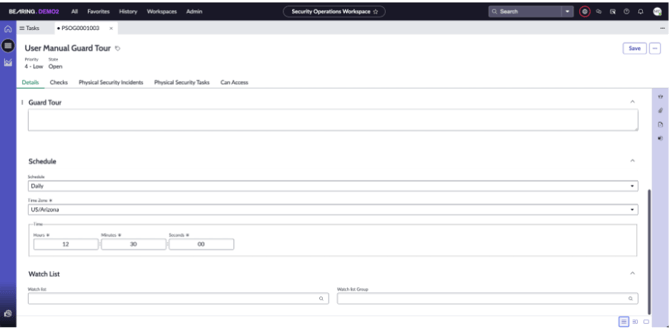
Checks
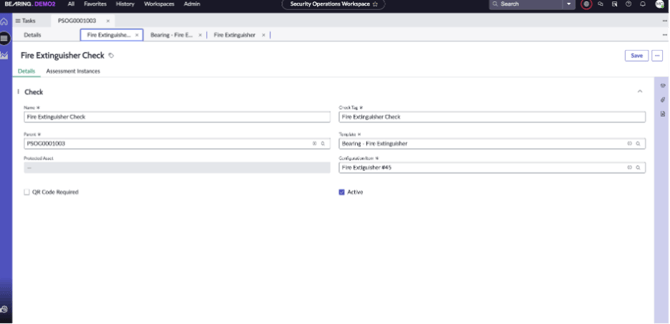
Checks are created in the ServiceNow Assessment module and they are designed to prompt the Security Guard with a series of questions based on the requirements of each Guard Tour. Multiple Checks can be be assigned to a single Guard Tour. To assign Checks to a Guard Tour:- In the Guard Tour, select the “Checks” tab
- Click “New”
- Assign a Name to the Check
- Assign a Check Tag
-
- The Check Tag field is used to access the Check from the ServiceNow Mobile app
- Select the Template
- This field pulls from the Assessments
- Select the Protected Asset
- Select the Configuration Item
- Click “Save”