Problem:
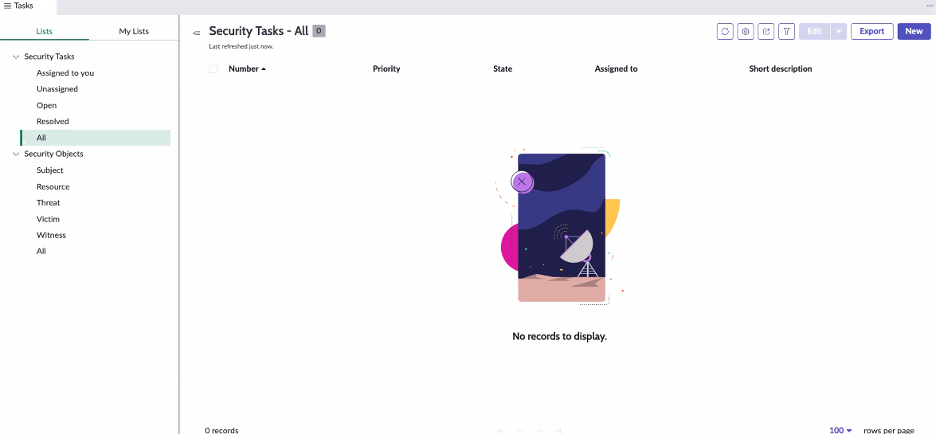
Users are unable to view all of the list categories in the Task menu.
Example:
Root Cause:
- Users may not have the correct permissions
- Permissions may be on a group rather than the individual user
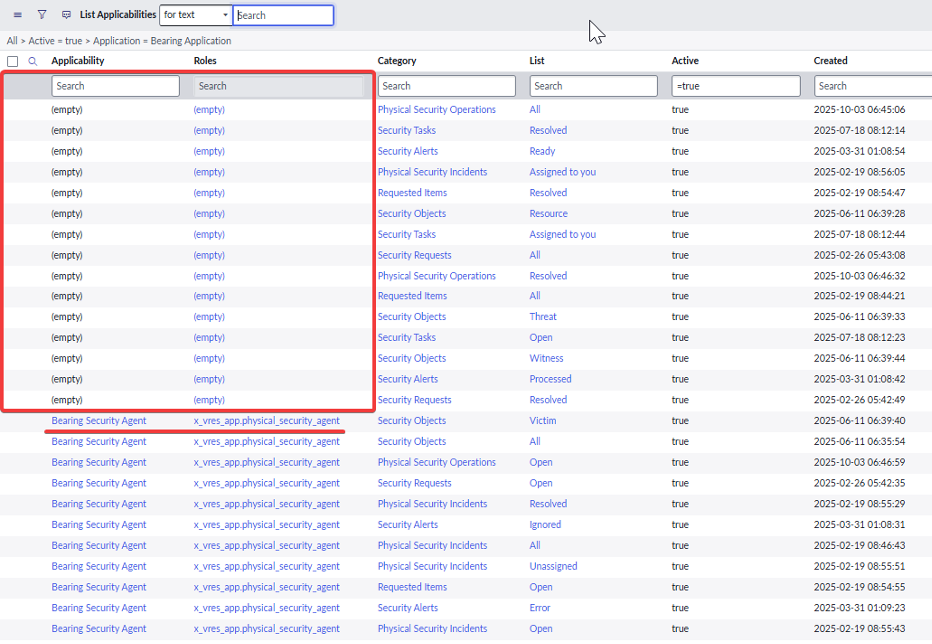
- There may be missing or incorrect entries in the sys_ux_applicability_m2m_list table.
- This prevents the system from linking the user's role/applicability record to the list categories.
Action Items:
- Confirm the user has the necessary roles: x_vres_app.security_integration_admin, x_vres_app.physical_security_administrator, or x_vres_app.physical_security_agent.
- If the user has roles assigned via a Group, try removing them from the group and adding them back.
- If that fails, try assigning the required roles directly to the user record (bypassing the group assignment) and retest to determine if it is a user-specific issue.
- If nothing from above worked please check the List Applicabilities table, In the Filter Navigator, open the table: “sys_ux_applicability_m2m_list.list”.
-
Filter by Bearing Application, and identify the records with the "empty" value in the Applicability or Roles fields.
- Choose the items with an "empty" Applicability field and populate it with the "Bearing Security Agent" value and click "update"
-